Sunday, December 22, 2013

Best Practice on Data Warehouse Environments

When growing in Data Warehousing on of the most asked questions by infrastructure is what is the best practice on how many environments must be running?

Some assumptions that is made that in the Medium and Big Environments there is also a DR (Disaster Recover) in place.

Each organisation is different in regards to budget and user needs the following is recommendations of most common environments:

Small / New Environment:


In a small or new environment it is best to have only the production server separated, as the cost are then kept at a minimum and UAT deployment can happen a lot quicker. When using this environment please ensure that the following is kept:

Job runs:  Jobs should be disabled in DEV/UAT and only run when user request, else is can slow down the whole environment.
Backups: Backups should only be run on the Development Projects (Daily) and Production (Daily)
Syncing: Once a project moves to Production the Development and UAT instances must be deleted from  the environment, if there is any changes the production project must be copied over and used.

Medium / Mature Environment:
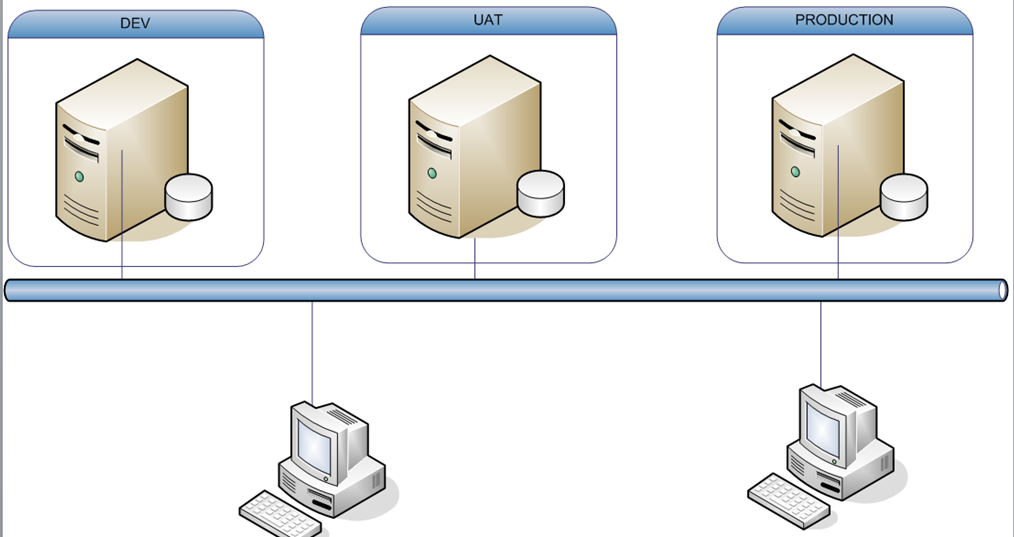


Job runs:  Jobs should be disabled in DEV. QA can have a 3 instance run to test while in UAT phase, after this is Must be disabled.
Backups: Backups should run on the DEV (Daily), UAT (Monthly) and Production (Daily)
Syncing: Once a project moves to Production the Development instances must be deleted from  the environment, if there is any changes the production project must be copied over and used, from here normal process follows, the UAT should not be deleted as this is use to test the changes does not have an project version impact.

Big / High Performance Environment:

This environment is used for critical Data Warehouse system that can have big impacts on business. They are also very expensive, but very stable in the long run.


Job runs:  Jobs should be disabled in DEV. QA can have a 3 instance run to test while in UAT phase, after this is Must be disabled. PRE-PROD should have the same run as PROD. This is to ensure environment as a whole testing impact before it goes into PROD.
Backups: Backups should run on the DEV (Daily), UAT (Monthly), PRE-PROD (Montly) and Production (Daily)
Syncing: Once a project moves to Production the Development instances must be deleted from  the environment, if there is any changes the production project must be copied over and used, from here normal process follows, the UAT should not be deleted as this is use to test the changes does not have an project version impact. The PRE-PROD is used for full environment impact.

Wednesday, November 27, 2013

Data Warehousing

When I started in 2007 (6 Years ago) on Data Warehousing a terabyte of data was a lot, I had no idea what was in stored. I was amazed when 6 years later we already at exabytes! It seems that there is a quiet revolution in progress.
What is data warehousing?

Processor or Virtual Storage

· 1 Bit = Binary Digit
· 8 Bits = 1 Byte
· 1024 Bytes = 1 Kilobyte
· 1024 Kilobytes = 1 Megabyte
· 1024 Megabytes = 1 Gigabyte
· 1024 Gigabytes = 1 Terabyte
· 1024 Terabytes = 1 Petabyte
· 1024 Petabytes = 1 Exabyte
· 1024 Exabytes = 1 Zettabyte
· 1024 Zettabytes = 1 Yottabyte
· 1024 Yottabytes = 1 Brontobyte
· 1024 Brontobytes = 1 Geopbyte· 1 Bit = Binary Digit

Disk Storage

· 8 Bits = 1 Byte
· 1000 Bytes = 1 Kilobyte
· 1000 Kilobytes = 1 Megabyte
· 1000 Megabytes = 1 Gigabyte
· 1000 Gigabytes = 1 Terabyte
· 1000 Terabytes = 1 Petabyte
· 1000 Petabytes = 1 Exabyte
· 1000 Exabytes = 1 Zettabyte
· 1000 Zettabytes = 1 Yottabyte
· 1000 Yottabytes = 1 Brontobyte
· 1000 Brontobytes = 1 Geopbyte


Bit

A bit is a value of either a 1 or 0 (on or off).

Nibble

A Nibble is 4 bits.

Byte

A Byte is 8 bits.

Kilobyte (KB)

A Kilobyte is 1,024 bytes.

Megabyte (MB)

A Megabyte is 1,048,576 bytes or 1,024 Kilobytes

873 pages of plaintext (1,200 characters)
4 books (200 pages or 240,000 characters)
Gigabyte (GB)

A Gigabyte is 1,073,741,824 (230) bytes. 1,024 Megabytes, or 1,048,576 Kilobytes.

894,784 pages of plaintext (1,200 characters)
4,473 books (200 pages or 240,000 characters)
341 digital pictures (with 3MB average file size)
256 MP3 audio files (with 4MB average file size)
1 650MB CD
Terabyte (TB)

A Terabyte is 1,099,511,627,776 (240) bytes, 1,024 Gigabytes, or 1,048,576 Megabytes.

916,259,689 pages of plaintext (1,200 characters)
4,581,298 books (200 pages or 240,000 characters)
349,525 digital pictures (with 3MB average file size)
262,144 MP3 audio files (with 4MB average file size)
1,613 650MB CD's
233 4.38GB DVD's
40 25GB Blu-ray discs
Petabyte (PB)

A Petabyte is 1,125,899,906,842,624 (250) bytes, 1,024 Terabytes, or 1,048,576 Gigabytes.

938,249,922,368 pages of plaintext (1,200 characters)
4,691,249,611 books (200 pages or 240,000 characters)
357,913,941 digital pictures (with 3MB average file size)
268,435,456 MP3 audio files (with 4MB average file size)
1,651,910 650MB CD's
239,400 4.38GB DVD's
41,943 25GB Blu-ray discs
Exabyte (EB)

A Exabyte is 1,152,921,504,606,846,976 (260) bytes, 1,024 Petabytes, or 1,048,576 Terabytes.

960,767,920,505,705 pages of plaintext (1,200 characters)
4,803,839,602,528 books (200 pages or 240,000 characters)
366,503,875,925 digital pictures (with 3MB average file size)
274,877,906,944 MP3 audio files (with 4MB average file size)
1,691,556,350 650MB CD's
245,146,535 4.38GB DVD's
42,949,672 25GB Blu-ray discs
Zettabyte (ZB)

A Zettabyte is 1,180,591,620,717,411,303,424 (270) bytes, 1,024 Exabytes, or 1,048,576 Petabytes.

983,826,350,597,842,752 pages of plaintext (1,200 characters)
4,919,131,752,989,213 books (200 pages or 240,000 characters)
375,299,968,947,541 digital pictures (with 3MB average file size)
281,474,976,710,656 MP3 audio files (with 4MB average file size)
1,732,153,702,834 650MB CD's
251,030,052,003 4.38GB DVD's
43,980,465,111 25GB Blu-ray discs
Yottabyte (YB)

A Yottabyte is 1,208,925,819,614,629,174,706,176 (280) bytes, 1,024 Zettabytes, or 1,048,576 Exabytes.

1,007,438,183,012,190,978,921 pages of plaintext (1,200 characters)
5,037,190,915,060,954,894 books (200 pages or 240,000 characters)
384,307,168,202,282,325 digital pictures (with 3MB average file size)
288,230,376,151,711,744 MP3 audio files (with 4MB average file size)
1,773,725,391,702,841 650MB CD's
257,054,773,251,740 4.38GB DVD's
45,035,996,273,704 25GB Blu-ray discs

What is Data Warehousing


Like the normal warehousing terminology data warehousing is the storing of data generated by businesses or computers. Wikipedia defines it as follows:

"A data warehouse or enterprise data warehouse (DW, DWH, or EDW) is a database used for reporting and data analysis. It is a central repository of data which is created by integrating data from one or more disparate sources. Data warehouses store current as well as historical data and are used for creating trending reports for senior management reporting such as annual and quarterly comparisons."

"A data mart is a small data warehouse focused on a specific area of interest. Data warehouses can be subdivided into data marts for improved performance and ease of use within that area. Alternatively, an organization can create one or more data marts as first steps towards a larger and more complex enterprise data warehouse."

Data Warehousing is not just focusing on the storage of data but also the integration, accumulation, distribution and analysis of data. Each of these is a specialization on its own. (Data Integration / ETL , Data Modeling, Data storage / Database, Business Intelligence (Decision Support Systems) & Data Visualization )

The 2 fathers of data warehousing is Bill Inmon & Ralph Kimball.

Ralph KimballBill Inmon
Build business process oriented small data marts which are joined to each other using common dimensions between business process.One centralize data warehouse which will act as a enterprise-wide data warehouse and then build data mart as per need for specific department or process
It is known as bottom-up approachIt is known as top down approach
Data marts should be build on dimensional modelling approachCentral data warehouse to follow ER modelling approach


It is recommended to know how both of them work and design a solution for the business using the one that will suit the needs the best. I find merit in both of these two men philosophies, and used them in many DW solutions. Industry standard models usually follows Inmon's methodology, where Kimball's works best for Business Intelligence reporting.